Home printers used to be a headache. Pricey ink that ran out at the worst time, annoying setup, and mediocre scans. That’s changed.
Ink tank printers make color printing cheap, compact laser printers churn out fast, clean text, and modern Wi-Fi plus mobile apps make setup and scanning from your phone actually easy.
The key is choosing the right type. A family printing homework and photos needs something very different from someone printing contracts and scanning documents every day. Get the match right, and a printer becomes genuinely useful instead of endlessly frustrating.
Best All-in-One Printers with Scanner for Home Offices, Students, and Families
The five printers below cover the full range, from a supertank inkjet that ships with up to three years of ink included and delivers near-zero running costs, to a business-class color laser that handles thousands of pages monthly with dual-sided single-pass scanning.
1. Brother DCP-L2640DW
The best mono laser for remote workers

Laser printing produces fundamentally different text output from inkjet printing, and the difference is most apparent in high-volume document work.
Text edges are sharper, output is smudge-proof immediately off the page, and the speed at 36 PPM handles a 50-page document in under two minutes. For remote workers printing contracts, reports, and manuscripts daily, those characteristics matter more than color capability.
The 50-sheet Automatic Document Feeder changes the scanning workflow for multi-page documents. Loading a contract or a stack of receipts and walking away while the machine scans through them sequentially is a meaningfully different experience from the one-page-at-a-time approach that flatbed-only scanners require.
High-yield toner options extend the time between replacements significantly, and Brother’s toner pricing is competitive with alternatives in the mono laser category.
The machine has no color printing capability, which is a real limitation for households where color output is occasionally needed, but for remote workers whose printing is primarily text-heavy documents, the color trade-off is irrelevant to their actual workflow.
Type: Monochrome laser multi-function | Key specs: 36 PPM, 1200×1200 DPI, automatic duplexing, 50-sheet ADF, wireless and mobile printing | Ink system: Toner (high-yield options available)
Pros:
- 36 PPM print speed is the fastest on this list for text documents, handling high-volume daily printing without the speed limitation that inkjet machines impose
- 50-sheet ADF handles multi-page document scanning without manual page loading, which changes the scanning workflow for users who regularly digitize contracts and reports
- Laser toner produces smudge-proof, sharp text output immediately off the page, eliminating the wet-ink handling time that inkjet documents require
Cons:
- No color printing capability is a genuine limitation for households where color output is occasionally needed, even if it’s not the primary use case
- Scanner output for color documents digitizes to color file formats, but physical print output is monochrome only, which requires clarification before buying for mixed-use households
Verdict: The most practical and reliable document printing machine on this list for remote workers and home offices where black-and-white text documents make up the overwhelming majority of daily print volume. Speed, scan throughput, and smudge-proof output are all better than inkjet alternatives at this price.
2. Epson EcoTank ET-2980
The best ink tank printer for low running costs

The EcoTank series works on a simple premise: replace tiny, expensive cartridges with large, refillable tanks and eliminate the cost structure that makes frequent color printing feel like a recurring tax.
The ET-2980 ships with enough ink to cover up to three years of typical household printing, which means the higher upfront price pays back relatively quickly for families and students who print regularly. After that initial ink supply runs out, refill bottles cost a fraction of what cartridge replacements charge for the same volume.
Print quality at 5760×1440 DPI handles both document text and photo printing at a level that most households’ needs don’t exceed. Auto two-sided printing covers the duplex requirement for school assignments and longer documents without manual page flipping.
Wi-Fi Direct handles mobile printing without routing through a router, which matters for households where the printer and the phone occasionally need to communicate directly.
The absence of an Automatic Document Feeder is the clearest functional limitation: multi-page document scanning requires feeding pages one at a time, which is workable for occasional use but becomes tedious for users who scan frequently.
Type: Color ink tank all-in-one | Key specs: 15 PPM (black), 5760×1440 DPI, auto two-sided printing, 1.44-inch color screen, Wi-Fi Direct | Ink system: Refillable tanks (up to 3 years of ink included)
Pros:
- Supertank refillable system delivers a cost-per-page that makes frequent color printing financially sustainable in a way that cartridge systems can’t match over a two to three-year period
- Three years of ink included in the box means the upfront price covers a substantial portion of the total ownership cost before any additional ink purchase is required
- Photo print quality at 5760×1440 DPI handles standard consumer photo printing without requiring a dedicated photo printer
Cons:
- No Automatic Document Feeder means multi-page document scanning requires manual one-at-a-time page feeding, which limits scanning throughput for document-heavy workflows
- Higher upfront purchase price than cartridge-based competitors, which requires printing above a minimum monthly volume to justify the cost difference
Verdict: The most cost-effective color printing investment for households that print regularly. For families, students, and anyone who has felt the frustration of cartridge replacement costs, the EcoTank running cost model changes the relationship with the printer entirely.
3. Canon Color imageCLASS MF665Cdw
The best color laser for quality and speed

Color laser printing produces output that looks distinctly different from color inkjet printing on standard paper.
Text with color elements, graphs, charts, and presentation materials all come out with sharper edges and more consistent color saturation from a laser than from an inkjet printing on the same paper stock.
For professionals printing marketing materials, client presentations, and branded documents at home, that quality difference is immediately visible.
The MF665Cdw matches the DCP-L2640DW’s mono print speed at 22 PPM for both color and black-and-white output, which is faster than any inkjet on this list for document work. The 50-sheet ADF and fast scanning engine handle multi-page document digitization at a pace that suits document-intensive professional workflows.
The five-inch color touchscreen interface operates more like a tablet than a traditional printer control panel, which reduces the navigation friction that older button-based printer interfaces introduce for less frequent users.
The three-year limited warranty is the best coverage period on this list and reduces the risk calculation for users making a higher-end printer investment.
Type: Wireless duplex color laser all-in-one | Key specs: 22 PPM (color and black), 600×600 DPI (up to 1200×1200), 50-sheet ADF, 5-inch color touchscreen
Pros:
- Color laser output produces sharper text edges and more consistent color saturation than inkjet printing on standard paper, which is the visible quality difference for marketing and presentation materials
- 22 PPM color print speed matches the mono laser speed on this list, handling volume color printing without the speed penalty that inkjet color printing imposes
- Three-year limited warranty is the strongest coverage period on this list, reducing the investment risk for users committing to a higher-price purchase
Cons:
- Physical footprint is larger than the compact options on this list, requiring dedicated desk or shelf space rather than fitting into a small corner setup
- Initial toner cartridge replacement cost is higher than inkjet alternatives, which affects the total cost calculation for users who print at lower monthly volumes
Verdict: The best option for creative professionals and small home businesses that regularly produce color marketing materials, client documents, and branded presentations and need laser-quality output to match the professional context those materials appear in.
4. Brother Work Smart 1360 (MFC-J1360DW)
The best budget all-rounder

The Work Smart 1360 covers the use case that describes most casual home printer users: occasional document printing, periodic photo output, regular scanning to PDF for email, and the need for a machine that doesn’t dominate a small desk.
The compact footprint fits on a shelf or the edge of a desk without requiring a dedicated space, and the automatic duplex printing covers two-sided output without manual page flipping.
The LC501 ink series delivers better yield-per-cartridge than previous Brother inkjet generations, which extends the time between replacement purchases for users who print at low-to-moderate monthly volumes.
The mobile app handles scan-to-phone and scan-to-cloud workflows without requiring a computer as an intermediary, which matters for students and remote workers who need a scanned document on their phone or in Google Drive quickly.
Refresh Subscription compatibility means automatic ink delivery is available for users who want to eliminate the out-of-ink surprise entirely.
Type: Wireless color inkjet all-in-one | Key specs: 16 PPM (black), 1.8-inch color display, automatic duplex, mobile printing, Refresh Subscription ready
Pros:
- Compact form factor fits standard home desk setups and small apartments without requiring a dedicated printer space
- Mobile app scan-to-phone and scan-to-cloud functionality handles document digitization without a computer as an intermediary
- Low entry price makes it a practical purchase for casual users and students who need printing and scanning capability without committing to a high-volume machine cost
Cons:
- Cost-per-page is higher than ink tank alternatives, which becomes a meaningful cost difference for users who consistently print above 30 to 40 pages per month
- The smaller paper tray requires more frequent reloading for users printing longer documents in a single session
Verdict: The right printer for casual home users who need reliable printing and scanning capability at a low upfront cost and don’t print at volumes where the per-page cost difference from an ink tank system justifies the higher purchase price.
5. Brother MFC-L8930CDW
The best for high-volume home offices
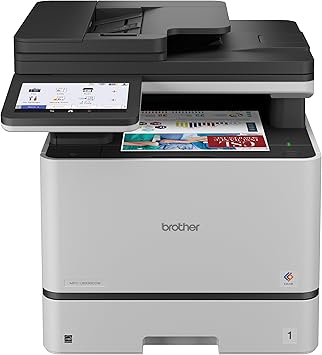
The MFC-L8930CDW is built around a different set of requirements from the other machines on this list.
Users running a full-scale professional operation from home, legal professionals processing large document volumes, and anyone scanning hundreds of pages weekly need machine specifications that casual home printers don’t provide.
The 42 PPM print speed handles large print jobs faster than any other machine on this list. The 70-page ADF with Dual-CIS single-pass duplex scanning processes both sides of a double-sided document in one pass rather than requiring two passes, which halves the scanning time for double-sided document stacks.
Expandable paper trays handle higher paper capacity without constant reloading, and the advanced security features, including NFC authentication and integrated cloud connectivity, address the data security requirements that professional use of a home printer involves.
Scanning directly to secure cloud destinations with authenticated access protects sensitive client and legal documents from casual access.
At the size and weight this machine requires, it needs dedicated space rather than sharing a desk with other equipment.
Type: Business-class color laser all-in-one | Key specs: 42 PPM, Dual-CIS single-pass duplex scanning, 70-page ADF, NFC authentication, integrated cloud connectivity, expandable paper trays
Pros:
- 42 PPM print speed is the fastest on this list by a significant margin, handling large-volume daily print jobs that would take substantially longer on mid-range machines
- Dual-CIS single-pass duplex scanning processes both sides of a document in one pass, halving scanning time for double-sided contracts, reports, and legal documents
- NFC authentication and integrated cloud security features address the document security requirements that professional home office use involves
Cons:
- Physical size and weight require dedicated office space rather than a shared desk setup, which is a genuine constraint for home offices that don’t have a separate room
- Performance specifications exceed the requirements of casual home printing use significantly, making it a poor value match for anything other than genuinely high-volume professional workflows
Verdict: The right machine for professionals running a serious operation from home who need enterprise-grade print speed, scanning throughput, and document security in a machine that fits a home environment. For everyone else, it’s more machine than the workload justifies.
At a Glance: The Top All-in-One Home Printers to Buy
| Product | Best for… | Type |
| Epson EcoTank ET-2980 | Best low running costs | Color ink tank |
| Brother DCP-L2640DW | Best for text documents | Mono laser AIO |
| Canon imageCLASS MF665Cdw | Best color laser quality | Color laser AIO |
| Brother Work Smart 1360 | Best budget all-rounder | Color inkjet AIO |
| Brother MFC-L8930CDW | Best high-volume home office | Professional color laser |
How to Choose the Best Printer with Scanner
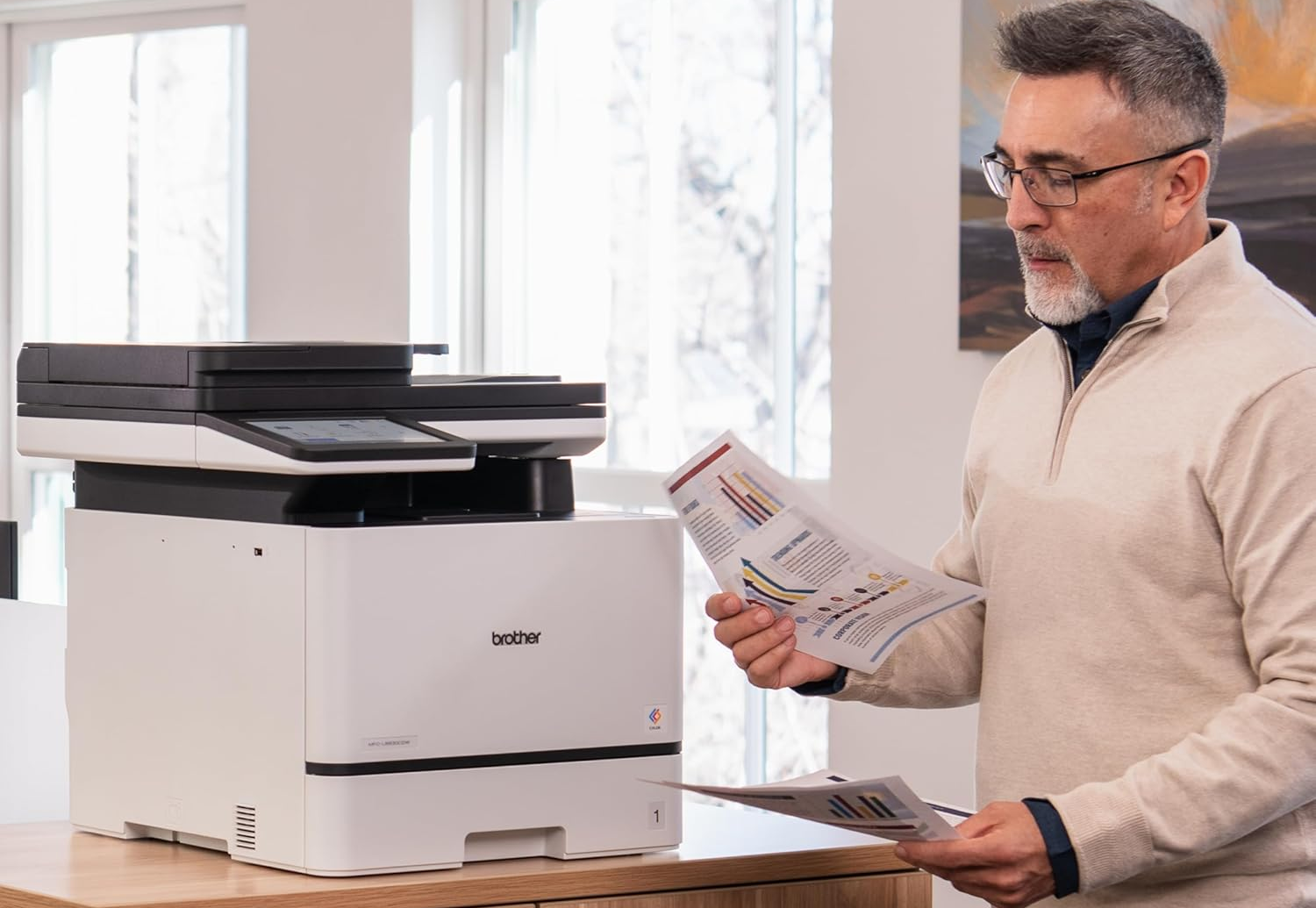
Ink system: tank vs. laser vs. cartridge
Ink tank systems (Epson EcoTank) produce the lowest long-term running cost for color printing and are the right choice for households printing more than 20 color pages per week. The higher upfront cost pays back within the first year for consistent color printers.
Laser systems produce the sharpest text output at the fastest speeds and the lowest cost-per-page for black-and-white document printing, making them the correct choice for document-heavy remote workers.
Cartridge inkjet systems have the lowest upfront cost and are appropriate for users who print infrequently, with the trade-off that cost-per-page is the highest of the three systems, and ink can clog if the printer sits unused for extended periods.
Scan quality and the Automatic Document Feeder
A flatbed scanner handles single pages and bound documents. An Automatic Document Feeder handles stacks of loose pages without manual intervention, which is the relevant capability for anyone who regularly scans multi-page contracts, tax documents, or reports.
Single-pass duplex ADF scanning (available on the MFC-L8930CDW) processes both sides of a double-sided document simultaneously, which doubles throughput for two-sided document scanning.
If scanning multi-page documents is a regular part of your workflow rather than an occasional task, an ADF is worth prioritizing over a flatbed-only scanner regardless of other specifications.
Connectivity and the app experience
AirPrint handles wireless printing from Apple devices without a dedicated app, and most current printers support it.
For Android users and scan-to-phone workflows, the quality of the manufacturer’s proprietary app matters more than the hardware specification. Brother iPrint&Scan and Canon PRINT both handle scan-to-PDF and direct cloud upload reliably.
Verify that the specific printer model supports direct scan to Google Drive or Dropbox if that workflow is part of your regular document management process, as cloud destination support varies between models even within the same manufacturer’s lineup.
Cost per page over time
The upfront price of a printer is the least useful number for evaluating its total cost. Cost-per-page, calculated from the ink or toner yield figures in the specification, determines the actual running cost over two to three years of ownership.
A $90 cartridge inkjet printing at 15 cents per color page costs significantly more than a $300 EcoTank printing at 0.3 cents per color page for any user printing above 30 pages monthly.
Calculate your expected monthly print volume and multiply by the cost-per-page difference before comparing purchase prices.
Frequently Asked Questions
Are all-in-one printers worth buying for home use?
For most households, yes. The ability to scan documents directly to a phone or cloud storage has become a genuinely useful daily capability rather than an occasional convenience.
Tax documents, signed contracts, identity documents, and receipts all benefit from reliable home scanning access.
The price difference between print-only and all-in-one models is small enough today that buying print-only to save money rarely makes practical sense.
Which is better for home use: an ink tank or a cartridge printer?
For households printing more than 20 pages per week, ink tank systems deliver substantially lower running costs and are a better long-term investment.
For users who print less than once a week, ink tank systems carry a risk of printhead clogging from ink drying in the tubes during extended idle periods, and a cartridge system maintained with occasional use is more practical.
The monthly print volume question determines the right answer more than any other factor.
What is the lowest cost-per-page option for home printing?
Monochrome laser printers produce the lowest cost-per-page for black-and-white text, typically under 2 cents per page with high-yield toner.
For color printing, Epson EcoTank systems deliver the lowest cost-per-page at roughly 0.3 cents for color output.
The comparison between mono laser and color ink tank depends on whether color printing is a regular requirement or an occasional need.
Can I scan directly to my phone?
Yes, and the workflow is significantly better than it was a few years ago.
Brother iPrint&Scan and Canon PRINT both handle scan-to-phone over Wi-Fi reliably, and most current models also support direct scan-to-cloud-storage for Google Drive, Dropbox, and similar services without routing through a computer.
Verify cloud destination support for your specific preferred service before purchasing if that workflow matters to your document management process.
How long do ink tank printers typically last?
With regular use and basic maintenance, a quality ink tank printer runs reliably for five to seven years.
The maintenance requirement that matters most is consistent use: printing at least one page every one to two weeks keeps ink moving through the tubes and prevents the printhead clogging that can permanently damage the printing mechanism.
Users who print very infrequently are better served by a laser printer that has no ink-drying risk during extended idle periods.