
Android tablets spent years being the awkward middle child. Too big to be a phone, not powerful enough to replace a laptop.
That’s changed. Android 16’s desktop mode is genuinely usable now, and the hardware has caught up to the point where a large-screen tablet can carry a full workday without embarrassing itself.
If you’re shopping in the 10.5-inch-and-above category, here’s what’s actually worth buying.
Top 5 Best Large Android Tablets to Buy
1. Samsung Galaxy Tab S11 Ultra (Model X930)
The best overall tablet

The Tab S11 Ultra is the easiest recommendation on this list, and also the most expensive.
That 14.6-inch Dynamic AMOLED 2X panel at 120Hz and 1600 nits peak brightness is genuinely hard to fault. Color accuracy, brightness outdoors, and sheer real estate for split-screen multitasking all hold up under daily use.
The Dimensity 9400+ handles Android 16’s AI-assisted features without lag.
The S-Pen is still the best stylus you can get on an Android device. Low latency, pressure sensitivity, and it ships in the box.
That matters when competitors charge an extra $100 for theirs.
Display: 14.6″ Dynamic AMOLED 2X, 120Hz, 1600 nits peak brightness | Performance: MediaTek Dimensity 9400+, 12GB RAM, 256GB storage | Battery: 11,600mAh with 45W fast charging | Audio: Quad AKG-tuned speakers, Dolby Atmos | Accessories: S-Pen included, magnetic keyboard support
Pros:
- 14.6″ screen with true multitasking real estate. Running three apps side by side is actually workable
- S-Pen latency and palm rejection are the best in the Android market
- IP68 rated for water and dust resistance
Cons:
- Size makes one-handed use impractical
- Price is at the top of the Android market
Best use case: Professionals, digital artists, and anyone who wants one device that handles everything from spreadsheets to Procreate.
Verdict: The most complete Android tablet available. If long-term software support and display quality are your top priorities, there’s nothing else to consider.
2. Lenovo Idea Tab Pro
The best for students

The Idea Tab Pro makes a specific bet: students don’t need OLED. They need a big, sharp screen, a pen that works, a case that protects the thing when it gets shoved into a backpack, and enough battery to last through a full day of classes.
Lenovo ships all of that in the box.
The 12.7-inch 3K LCD at 144Hz is bright enough for outdoor use and smooth enough that scrolling through dense PDFs feels responsive.
Gemini integration handles AI-assisted research and summarization without needing a third-party app.
For a college student writing papers, reviewing lecture slides, and taking handwritten notes in the same session, this setup covers it.
Display: 12.7″ 3K (2944 x 1840) LCD, 144Hz | Performance: MediaTek Dimensity 8300, 8GB RAM, 128GB storage | Battery: 10,200mAh with 45W fast charging | Audio: Quad JBL speakers, Dolby Atmos | Accessories: Lenovo Tab Pen Plus and folio case included
Pros:
- Pen and case included. Saves $100–150 compared to buying accessories separately
- Gemini AI integration works well for note summarization, research, and drafting
- 144Hz makes scrolling through dense academic PDFs noticeably smoother
Cons:
- LCD doesn’t reach the contrast levels of the AMOLED competition
- 128GB base storage fills up fast if you’re storing offline lecture recordings or 4K media
Best use case: High school and college students who want a complete, all-in-one study setup that doesn’t require a separate accessory purchase.
Verdict: Hard to beat at the price. The included pen and folio case alone justify the cost difference over buying components separately.
3. OnePlus Pad 3
The best for gaming

OnePlus built the Pad 3 around two things: raw performance and charging speed.
The Snapdragon 8 Elite handles the current most demanding mobile titles at 144Hz without frame drops, and the thermal design holds up during long sessions.
Sustained performance, not just burst performance. That distinction matters more than it gets credit for.
The 80W SuperVOOC charging is legitimately fast. A dead tablet charging to 100% in under an hour means you don’t have to plan around it.
Display: 13.2″ LTPS LCD, 3.4K resolution, 144Hz adaptive refresh | Performance: Snapdragon 8 Elite, 12GB/16GB LPDDR5X RAM | Battery: 12,140mAh with 80W SuperVOOC charging | Audio: 8-speaker system with 4 woofers and 4 tweeters
Pros:
- 80W charging on a 12,140mAh battery is the fastest on this list by a significant margin
- Thermal management stays consistent across long gaming sessions. No throttling after 30 minutes
- 7:5 aspect ratio works well for both portrait reading and landscape gaming
Cons:
- LCD panel won’t satisfy anyone coming from an AMOLED device. Blacks look grey in dark rooms
- No microSD slot, so 256GB or 512GB is what you get
Best use case: Gamers and power users who want flagship processing power and fast charging without paying Samsung’s premium.
Verdict: The Snapdragon 8 Elite and 80W charging make it the performance pick on this list. If gaming is the primary use case, this is the one.
4. Xiaomi Pad 7 Pro
The best for streaming and media
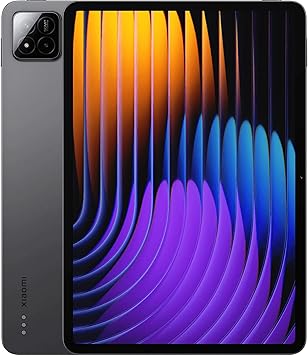
The Pad 7 Pro is built around its display, and the 12.1-inch 3.2K panel with HDR10+ and Dolby Vision support delivers.
The 3:2 aspect ratio cuts down on the black bars that plague 16:9 tablets when watching modern content.
Wi-Fi 7 Multi-Link Operation means the tablet can pull from multiple bands simultaneously. In practice, that’s lower buffering and more consistent streaming even on congested home networks.
HyperOS will frustrate some users who prefer stock Android. It’s heavily skinned, and some Western users find the UI choices polarizing. That’s a real tradeoff worth knowing before buying.
Display: 12.1″ LCD, 3.2K, 144Hz, HDR10+, Dolby Vision | Performance: Snapdragon 8s Gen 3, 8GB/12GB RAM | Audio: Quad speakers with dedicated bass chambers
Pros:
- 3.2K pixel density at 12.1 inches is sharp enough that individual pixels aren’t visible at normal viewing distance
- Wi-Fi 7 with Multi-Link Operation handles 8K streaming without buffering
- Price sits below the Samsung and OnePlus options for comparable display specs
Cons:
- HyperOS is heavily customized. Western users accustomed to near-stock Android may find it jarring
- Global availability varies by region; check stock before committing
Best use case: Media-focused users who want a premium viewing experience (HDR movies, YouTube, and streaming apps) at a price below the Samsung tier.
Verdict: The display-to-price ratio here is hard to argue with. If you spend more time watching than working, this is the smart pick.
5. TCL NXTPAPER 14
The best for reading, writing & musicians
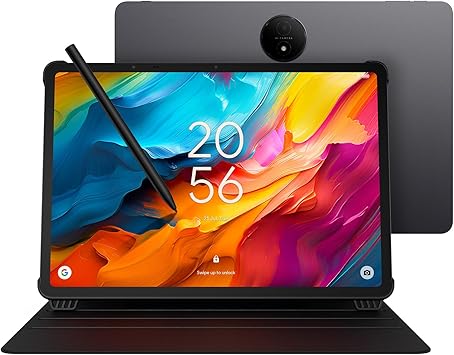
The NXTPAPER 14 isn’t for everyone, and it doesn’t try to be. NXTPAPER 3.0 is a matte, textured display that diffuses ambient light instead of reflecting it back at you.
If you’ve ever read on a glossy tablet for two hours and ended the session with a headache, this is the answer to that.
Zero glare, reduced blue light output, and a surface texture that feels closer to paper than glass.
For musicians using a tablet as a digital score reader, that 14.3-inch display size at zero glare is genuinely practical for reading sheet music on a stand.
For illustrators and annotators, the included 4096-level stylus on a matte surface gives you actual friction, closer to drawing on paper than any glossy tablet can offer.
Display: 14.3″ NXTPAPER 3.0 paper-like display | Performance: Mediatek Helio G99, 8GB + 8GB virtual RAM, 256GB storage | Battery: 10,000mAh with multi-window support | Audio: Stereo speakers tuned for voice clarity | Accessories: 4096-level stylus and flip case included
Pros:
- 14.3″ glare-free display is the most comfortable for extended reading sessions: PDFs, ebooks, and sheet music
- Outdoor readability is the best on this list
- 256GB base storage handles large sheet music libraries and illustration files without cloud dependency
Cons:
- HDR video looks flat compared to AMOLED. Colors are muted by design
- 144Hz gaming is not what this tablet was built for
Best use case: Musicians using tablets for digital scores, illustrators who want a matte drawing surface, and anyone who reads for hours and doesn’t want eye strain.
Verdict: A niche pick that’s exactly right for the niche it targets. If eye comfort and a paper-like experience matter more than color saturation, nothing else on this list competes.
Comparison Table: Flagship Large Android Tablets
Tablet
Screen
Processor
RAM
Best For
Tab S11 Ultra
14.6″ AMOLED
Dimensity 9400+
12GB
Everything / High-End
Idea Tab Pro
12.7″ 3K LCD
Dimensity 8300
8GB
Students / AI
OnePlus Pad 3
13.2″ LCD
Snapdragon 8 Elite
12/16GB
Gaming
Xiaomi Pad 7 Pro
12.1″ LCD
Snapdragon 8s Gen 3
8/12GB
Streaming
TCL NXTPAPER 14
14.3″ NXTPAPER
Mediatek Octa-core
8GB+8GB
Reading / Musicians
How to Choose the Right Large Android Tablet

Display quality vs. eye comfort
AMOLED panels (Samsung) give you the best color depth and contrast for creative work and movies.
If you find your eyes are tired after an hour of reading or writing, the NXTPAPER technology in the TCL is built specifically for that. It mimics the light-diffusion properties of paper rather than emitting direct backlight toward your face.
Performance and RAM
Android 16’s multi-window mode and background AI processing are genuinely RAM-hungry. 8GB is the floor for a smooth experience; anything below that and you’ll notice apps reloading when you switch back to them.
For gaming or heavy multitasking (multiple browser tabs, a video, and a document open simultaneously), 12GB is worth the price jump.
Accessories and total cost
The Lenovo Idea Tab Pro and TCL NXTPAPER 14 both include pens and protective cases in the box.
That’s a $100-150 difference in real-world cost compared to buying those accessories separately for a Samsung or OnePlus device. Factor that into the price comparison before assuming the cheaper-sticker option is actually cheaper.
Gaming performance: refresh rate and thermals
A high refresh rate display (120Hz or 144Hz) makes a real difference in gaming, but so does thermal management.
A tablet that runs at 144Hz for 10 minutes and then throttles down to 90Hz is worse than one that holds 120Hz consistently. OnePlus has historically handled sustained thermal performance better than most.
Frequently Asked Questions
Can these tablets actually replace a laptop?
For most students and office workers, yes. Android 16’s desktop windowing mode lets you resize and overlap apps in a way that’s genuinely functional for document editing, email, and research.
The Galaxy Tab S11 Ultra and Lenovo Idea Tab Pro both support external monitors and Bluetooth keyboards. The exception is specialized software: full AutoCAD, heavy video encoding, and professional audio production still need a laptop.
What’s the real difference between OLED, LCD, and NXTPAPER?
OLED (Samsung) has self-lit pixels, which means true blacks and the best color accuracy. It’s the best display for movie watching and creative color work.
LCD (OnePlus, Xiaomi, Lenovo) is usually brighter and cheaper to produce; better for gaming at high refresh rates, though dark scenes look slightly grey.
NXTPAPER (TCL) is a matte display designed to eliminate glare and reduce blue light, trading color saturation for eye comfort over long sessions.
Is 128GB of storage enough today?
If you’re primarily working in cloud storage — Google Drive, Spotify, Netflix — 128GB works fine. Download 4K movies offline, large games like Genshin Impact, or keep a large illustration library locally, and you’ll fill it fast. The Lenovo Idea Tab Pro is worth watching here, since microSD expansion covers the gap affordably.
Do I actually need Wi-Fi 7?
Wi-Fi 6E is still fast enough for most uses. Wi-Fi 7 adds Multi-Link Operation, which lets the tablet connect to multiple frequency bands simultaneously. The main practical benefit is lower latency during gaming and more consistent 8K streaming on congested home networks.
If you have a Wi-Fi 7 router already, the Xiaomi and OnePlus models will use it. If you don’t, it’s not a reason to choose one tablet over another.
How long will these tablets get software updates?
Samsung leads, with 7 years of OS and security updates on the Tab S11 Ultra. That matters if you’re buying something at this price and planning to use it for 5+ years. Lenovo and OnePlus are in the 3-4 year range. For long-term value, Samsung wins.
What does “virtual RAM” actually mean?
Virtual RAM borrows unused storage space to act as overflow memory. It keeps more apps loaded in the background, but it’s slower than physical RAM. Storage read/write speeds are nowhere near actual LPDDR5X memory speeds.
For gaming and heavy multitasking, the physical RAM number is what matters. Virtual RAM is a fallback, not a substitute.